There are many ways to get payments to monetice yours online cources.
Manual Processing Payments
There are many ways to get paid from your courses.
Including Payments Instructions
Maybe the easy way to get paid on line is to include Payments Instructions
Bank: ##########

Account: ###-####-####-###

Beneficiary: Account Holder Name

Confirmation: Send your payment confirmation to user@domain.tdl before than DD/MMMM/YYYY
With this info people interested in your course can send you a email with the payment and you can create a new user, enroll the user in the course and send this information to your users.
Note
Please note that this metod is effective to get paid, but you, or something than help you to check for payment notification must be available to process the request as soon as posible, you must consider that the time to get a responce from you is very import for the experience of your users.
Paypal
NOW LMS supports both manual and automated PayPal payment processing. To accept payments with PayPal you need a Business Account. PayPal accepts many forms of payments.
Automated PayPal Integration (Recommended)
NOW LMS includes built-in PayPal integration that automatically processes payments and enrolls students in courses. This is the recommended approach for production use.
Features
- Automatic payment processing: Students are redirected to PayPal for secure payment
- Instant enrollment: Students are automatically enrolled after successful payment
- Payment tracking: All payments are tracked with detailed status information
- Audit mode: Optional audit access for students who want to preview course content
- Secure credential storage: PayPal API credentials are encrypted in the database
Setup
-
Create PayPal Developer Account
- Visit PayPal Developer Portal
- Create a new application for your LMS
- Note your Client ID and Client Secret for both sandbox and live environments
-
Configure NOW LMS
- Go to Admin Panel → Settings → PayPal Configuration (
/setting/paypal) - Enable PayPal payments
- Select sandbox or production mode
- Enter your PayPal Client ID and Client Secret
- Client secrets are automatically encrypted before storage
- Go to Admin Panel → Settings → PayPal Configuration (
-
Test the Integration
- Create a test course with payment enabled
- Use PayPal sandbox credentials
- Test the complete payment flow
Payment Flow
- Student selects a paid course and clicks "Enroll"
- System redirects to PayPal payment page
- PayPal JavaScript SDK loads with site configuration
- PayPal buttons render with course price and currency
- Student clicks PayPal button and completes payment in popup
- Payment is captured and confirmed on client side
- Client sends payment details to server for verification
- Server verifies payment with PayPal REST API
- Server creates enrollment record and marks payment as completed
- Student is redirected to course page with immediate access
Course Types
- Free Courses: Students can enroll immediately without payment
- Paid Courses: Payment required before enrollment
- Auditable Courses: Students can choose between:
- Audit Mode: Free access to content without certificates
- Full Access: Paid access with certificates and evaluations
Manual PayPal Processing
Accepting payments with Paypal and manually enrolling the user.
With Paypal you can accetp payments and manually enrolling users in course with Paypalme and Payment Request,
Paypalme
Get paid with a custom link with Paypal.me,
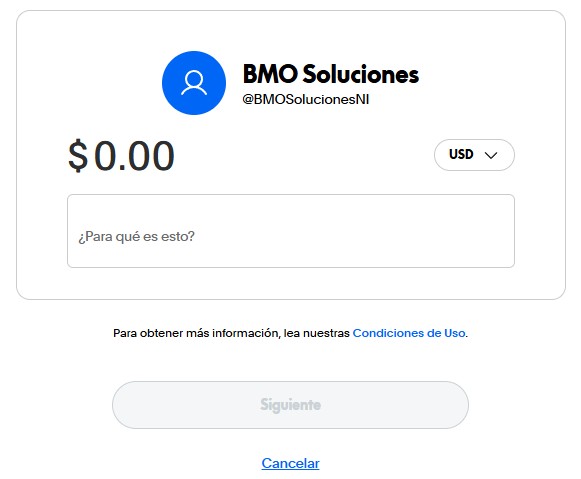
Just note that after the payment is done you must procces the enroll manually.
Warning
Note that if you do not proccess quickly the request the user can fell cheated and issue a reimbursement with Paypal, if many customer start issuing reimbursement aganist your account your reputation in the plataform will decrease and your account can be canceled.
Transfer Request
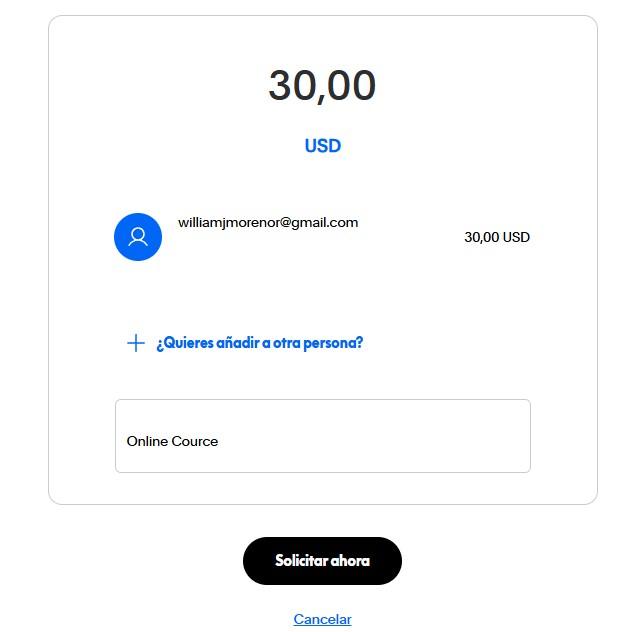
You can may a request to your user to issue a payment to your account with the Payment Request option, this way a user will contact you, the user must provide its Paypal user and you can generate a invoice to the user, once the payment is done you can enroll the user in the course.
Warning
Note that if you do not proccess quickly the request the user can fell cheated and issue a reimbursement with Paypal, if many customer start issuing reimbursement aganist your account your reputation in the plataform will decrease and your account can be canceled.